Data wrangling I

POL51

Haley Daarstad

University of California, Davis

October 21, 2026

Plan for today

Review Data Visualization

Wrangling and pipes

Subsetting data

Graph 4: the barplot

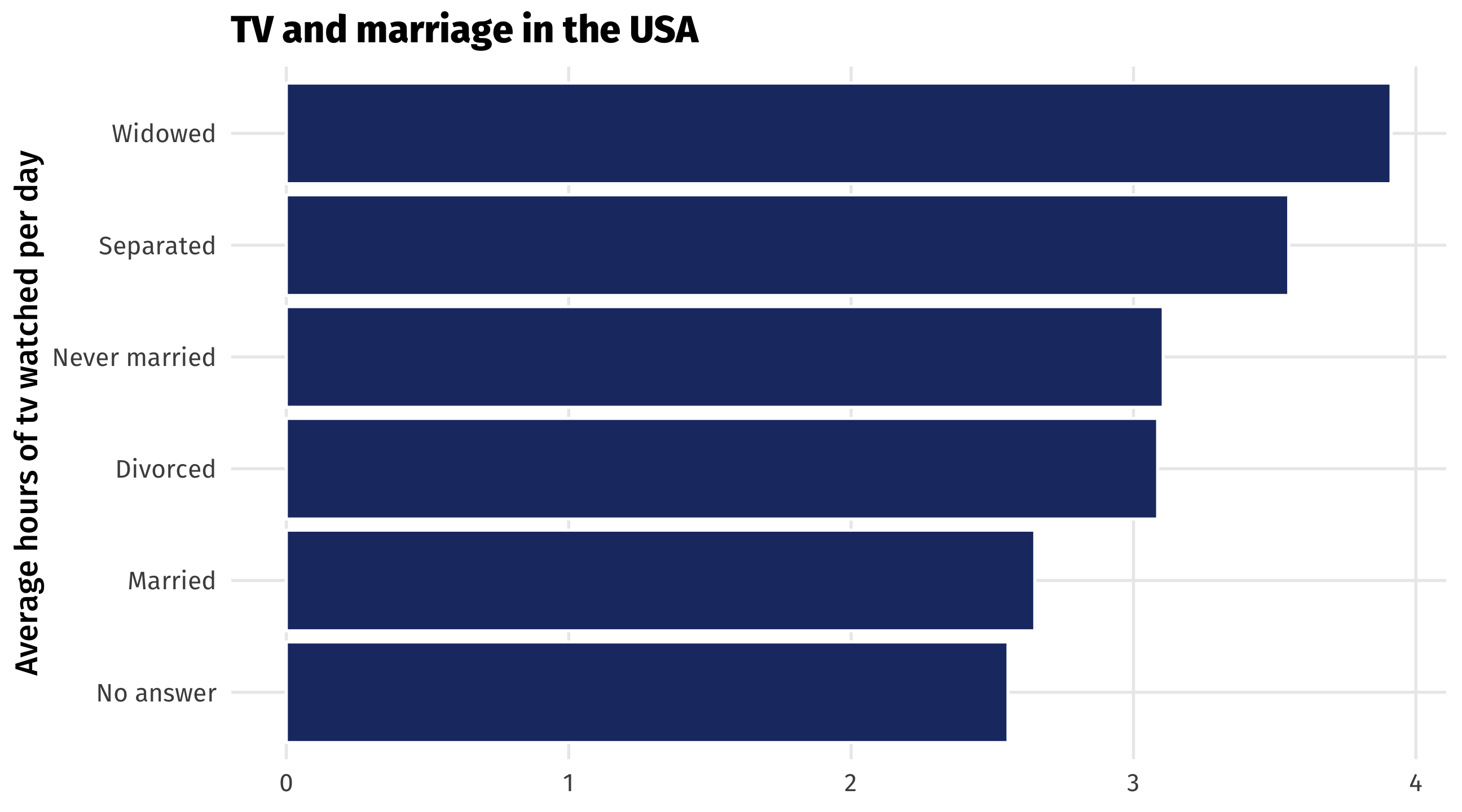
Barplots place a category (place, country, person, etc) on one axis and a quantity (amount, average, median, etc.) on another

Useful for making comparisons, highlighting differences

Why would there be differences across TV consumption?

The grammar of barplots

The data
marital tv
No answer 2.56
Never married 3.11
Separated 3.55
Divorced 3.09
Widowed 3.91
Mapping the data
Data Aesthetic Geometry
tv x geom_col()
marital y geom_col()


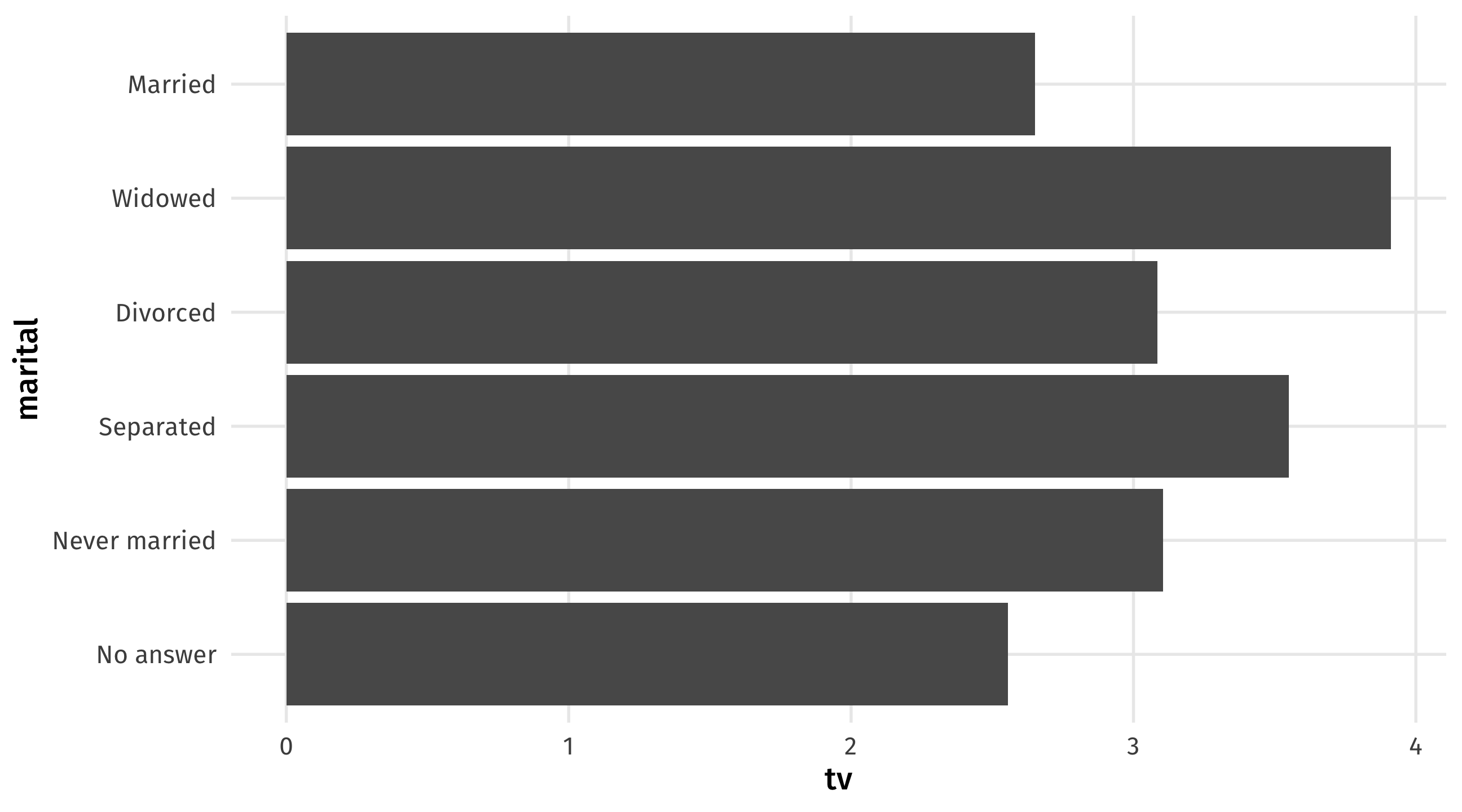
You could switch the x and y mapping around, but I think categories look better on the y-axis

The barplot

ggplot(tv, aes(y = marital, x = tv)) + 
  geom_col()

Graph 5: the boxplot

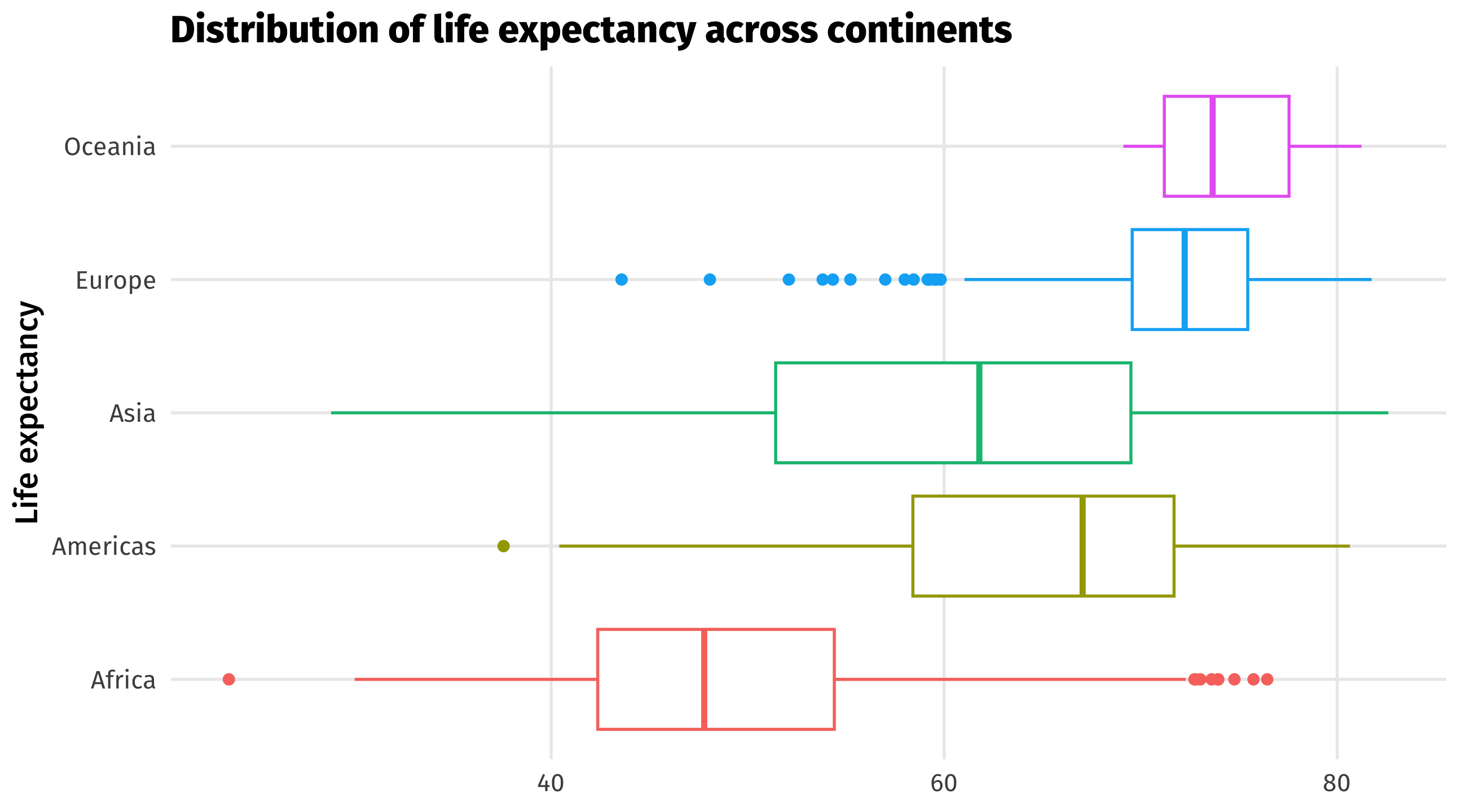
Boxplots compare distributions of continuous variables across groups

they show us more than the barplot which only gives us a quantity for each group

Compare distributions: the boxplot

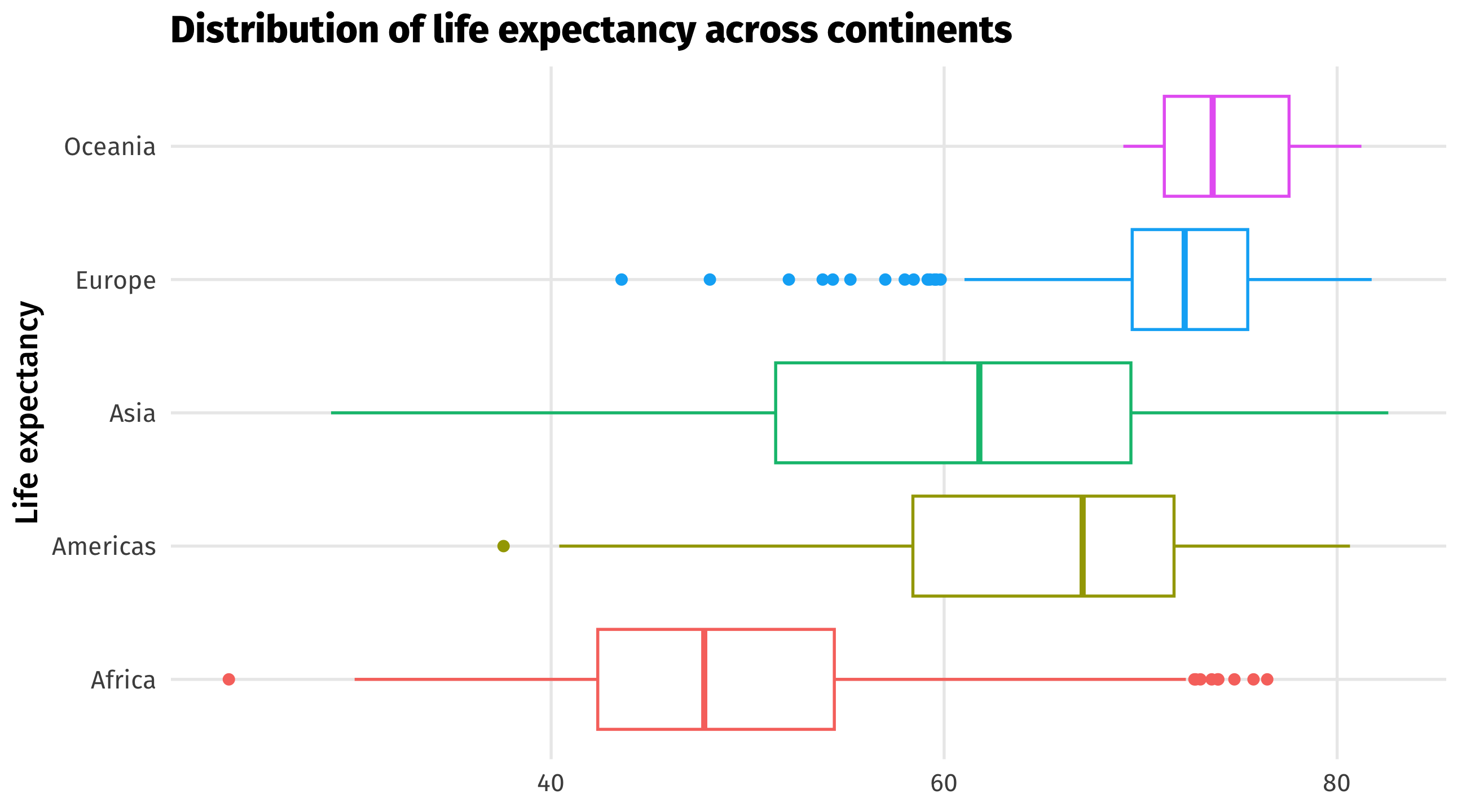
Boxplots contain a lot of info 🥵:

  • bold line is the median observation
  • box is the middle 50% of observations
  • thin lines show you min and max value, except…
  • the dots, which are outlier observations
interpret

The grammar of boxplots

The data
continent lifeExp
Asia 43.83
Europe 76.42
Africa 72.30
Africa 42.73
Americas 75.32
Mapping the data
Data Aesthetic Geometry
contient y geom_boxplot()
lifeExp x geom_boxplot()


You could switch the x and y mapping around, but I think categories look better on the y-axis

The five(-ish) graphs

Graph aes() geom_ Purpose
Scatterplot x = cause, y = effect point() Relationships
Time series x = date, y = variable line() Trends
Histogram x = cont. variable histogram() Distributions
Barplot y = category, x = quantity col() Compare amounts
Boxplot y = category, x = cont. variable boxplot() Compare distributions

Know how and when to use which!

Making better graphs

  • We’ve barely scratched the surface; there’s many more aesthetics, geometries, and layers in ggplot()

  • Here are some of my favorite ones

  • And some ideas for making graphs better

Showing “movement” using panels

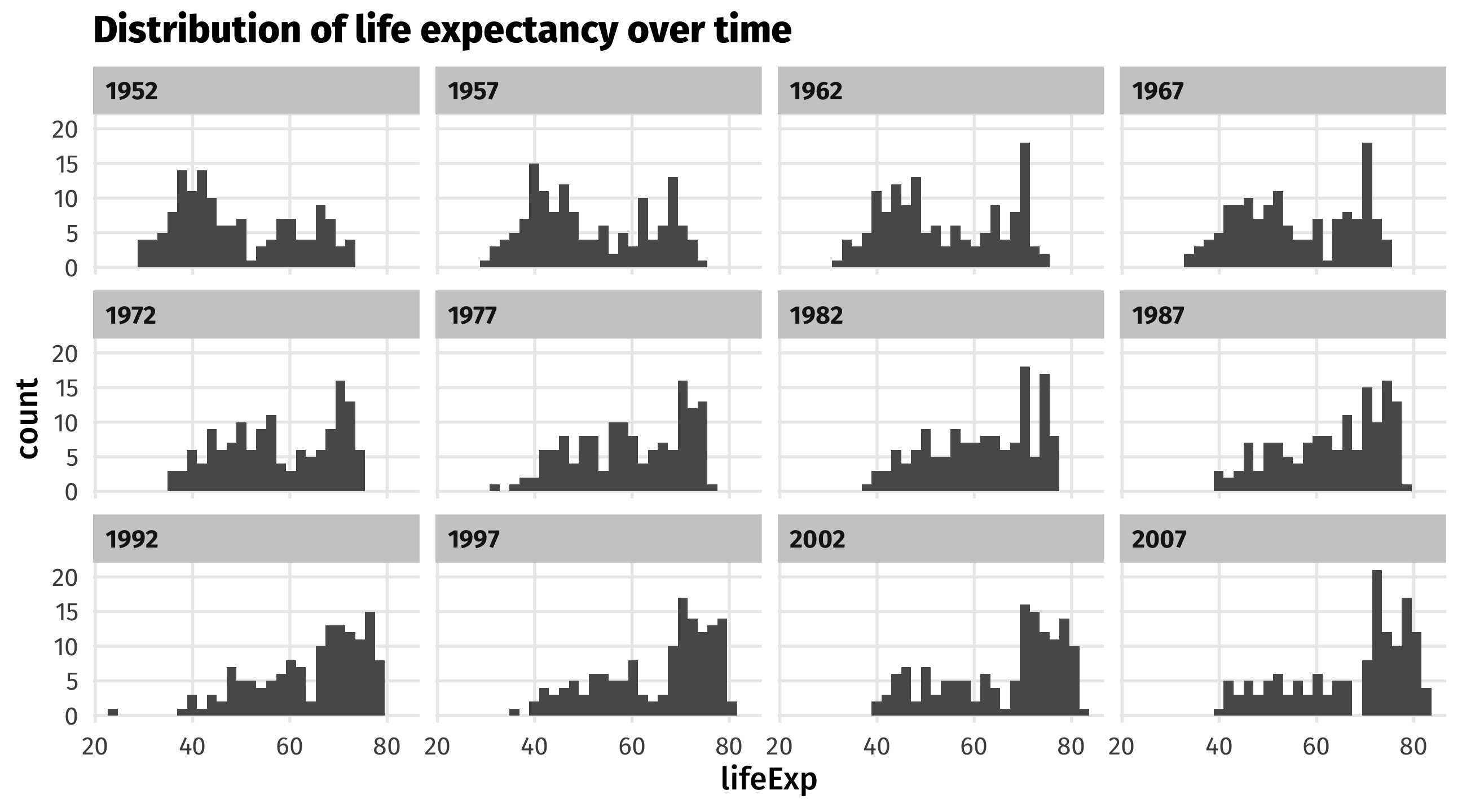
We can use panels to show movement of a variable across time, space, etc.

What is this graph showing us?

Using facet_wrap
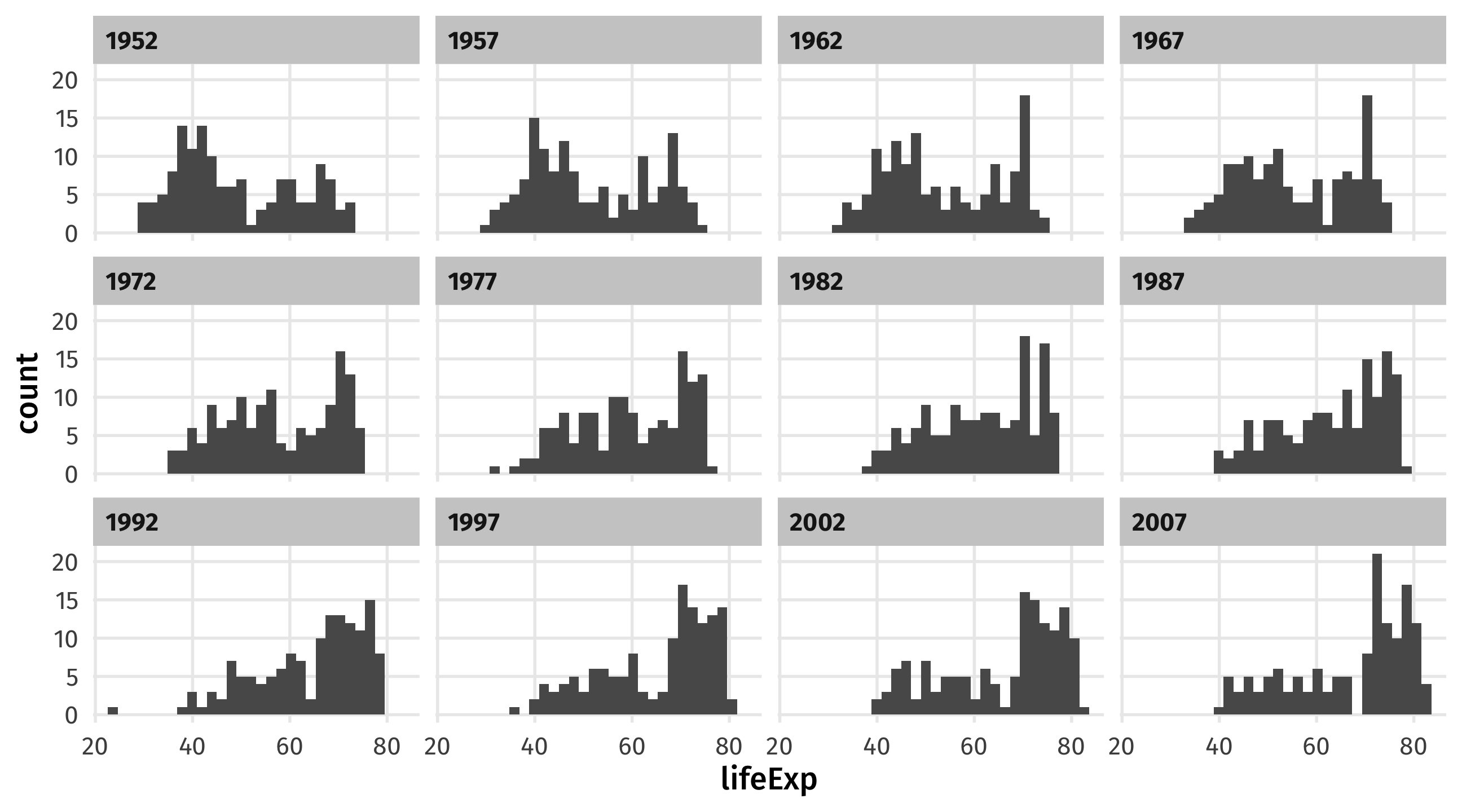
ggplot(gapminder, aes(x = lifeExp)) + geom_histogram() + 
  facet_wrap(vars(year)) 

Make sure the facetting variable is wrapped in vars()!

Make aesthetics static
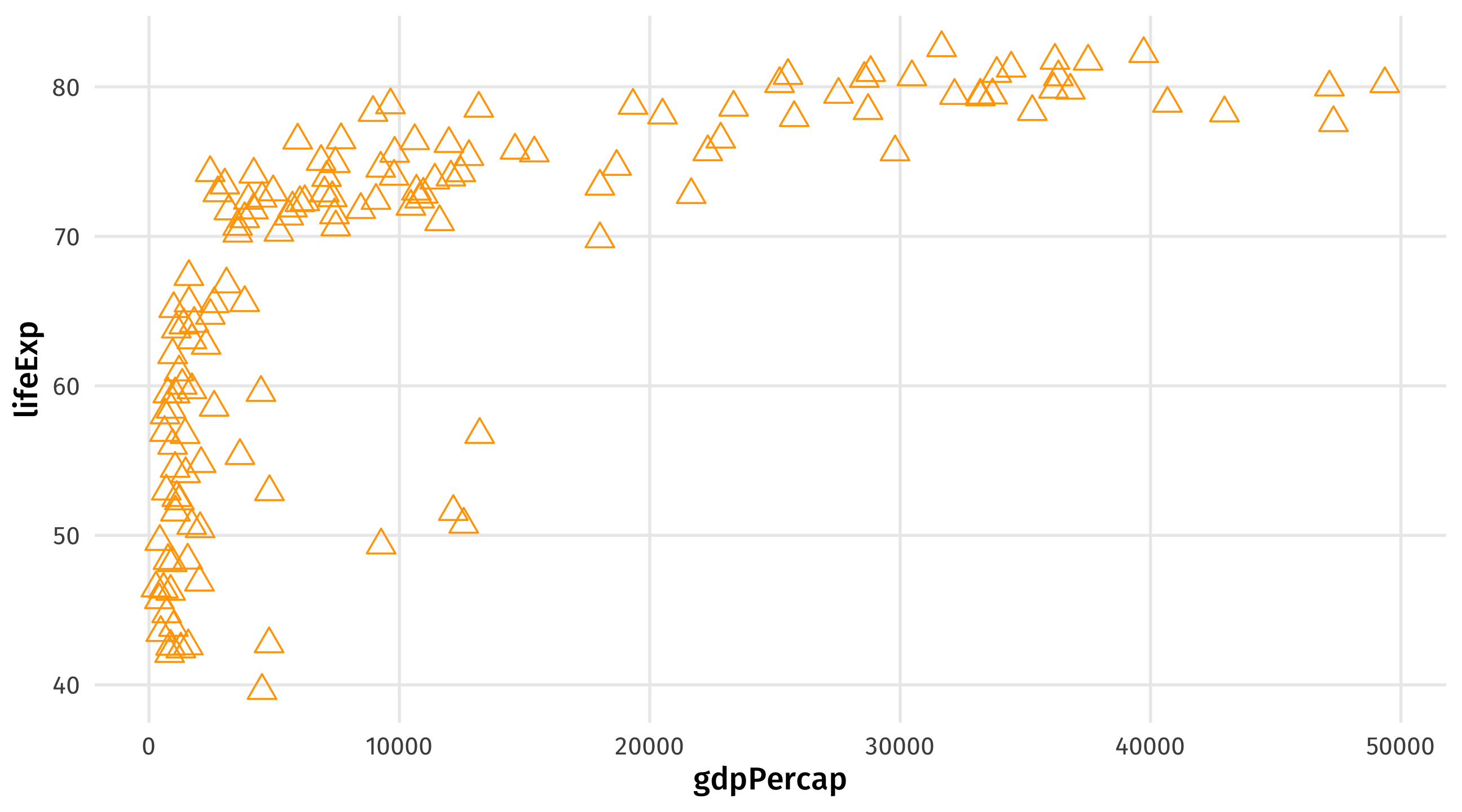
ggplot(gap_07, aes(x = gdpPercap, y = lifeExp)) + 
  geom_point(size = 4, color = "orange", shape = 2) 

Take your aesthetics out of aes() and into geom() to make them static

Use different color and fill scales
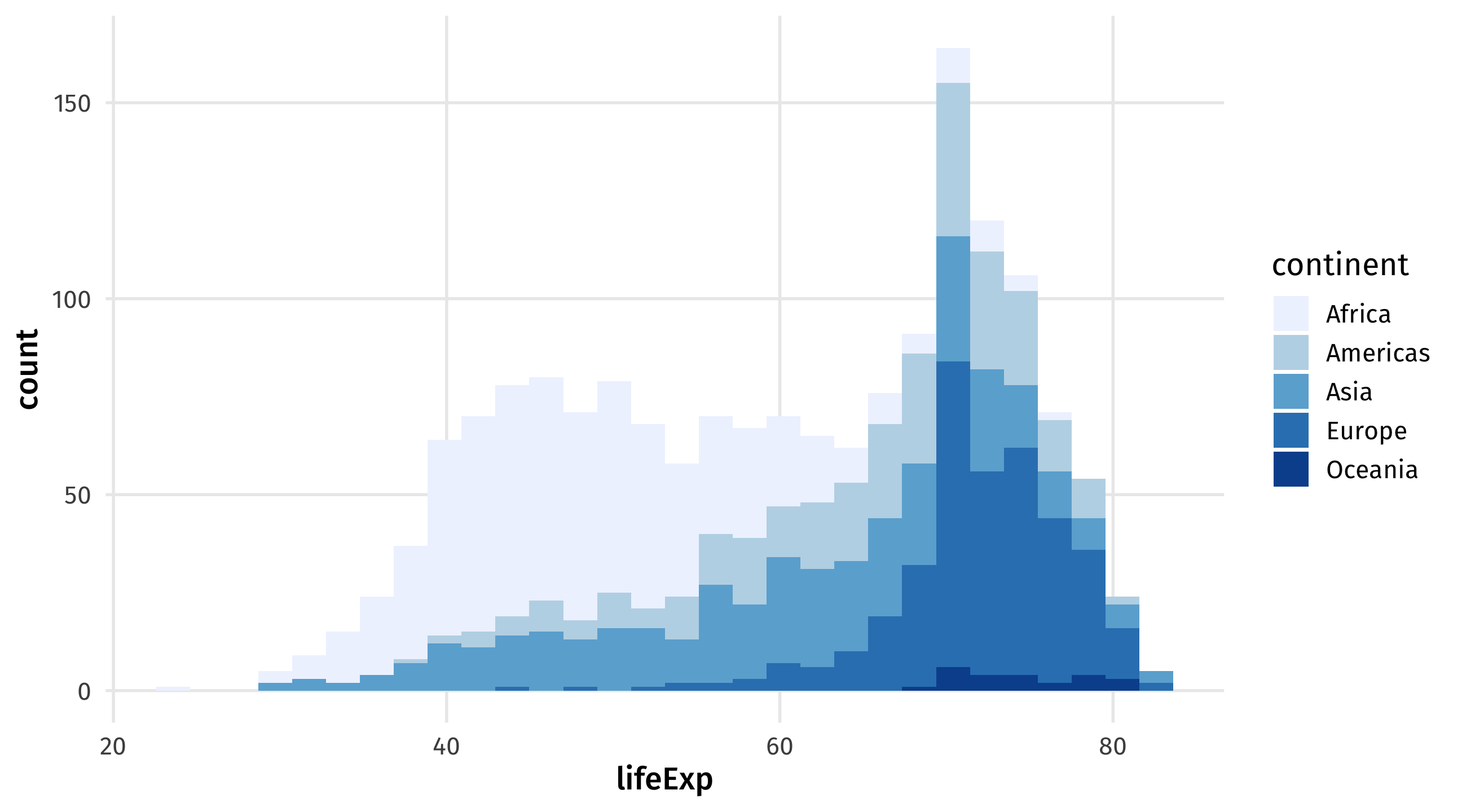
ggplot(gapminder, aes(x = lifeExp, fill = continent)) + geom_histogram() + 
  scale_fill_brewer(palette = "Blues") 

scale_fill_brewer() for fill, scale_color_brewer for color

My favorite scale (right now)
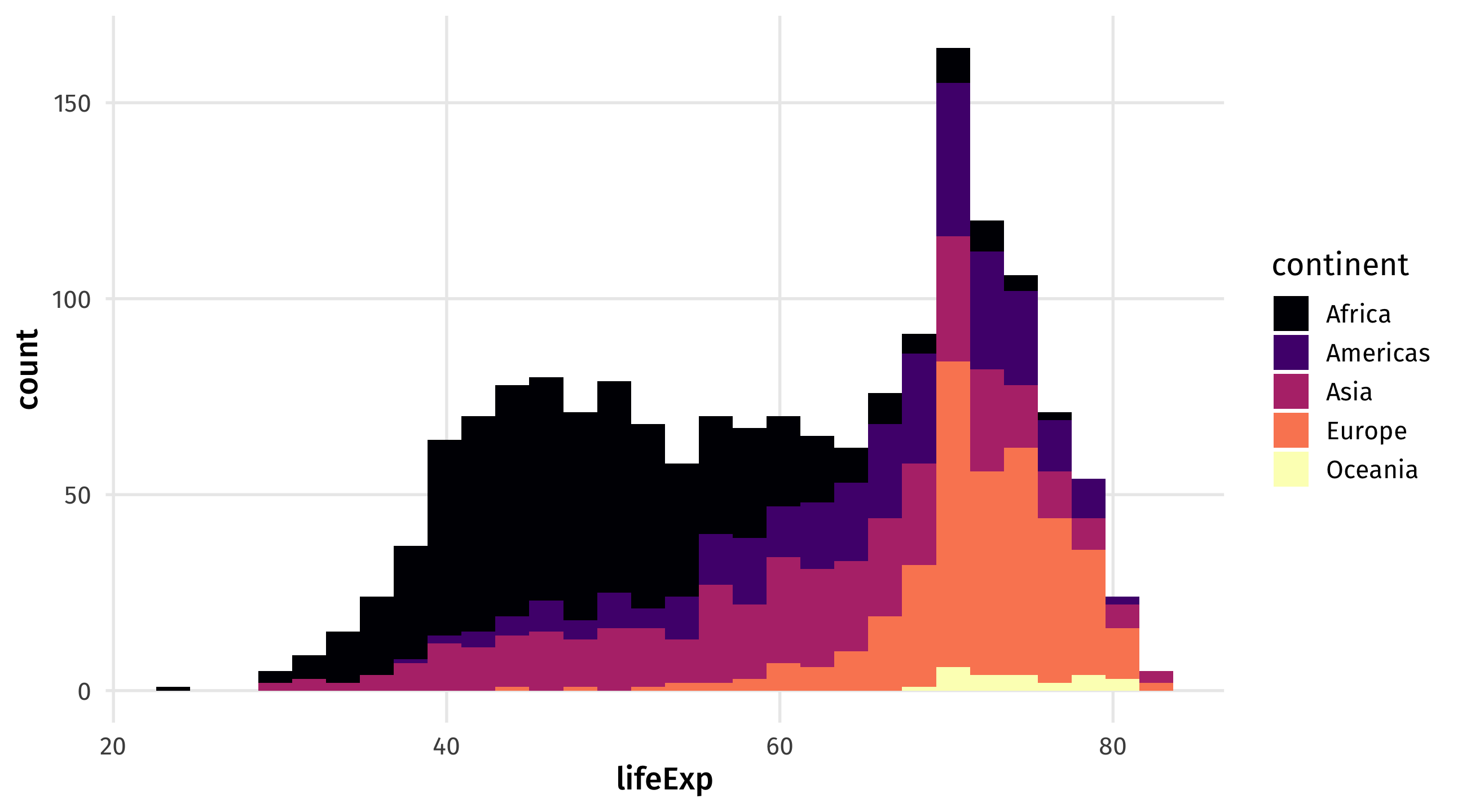
ggplot(gapminder, aes(x = lifeExp, fill = continent)) + geom_histogram() + 
  scale_fill_viridis_d(option = "magma") 

scale_fill_viridis_d for discrete variables, scale_fill_viridis_d for continuous

Many other themes
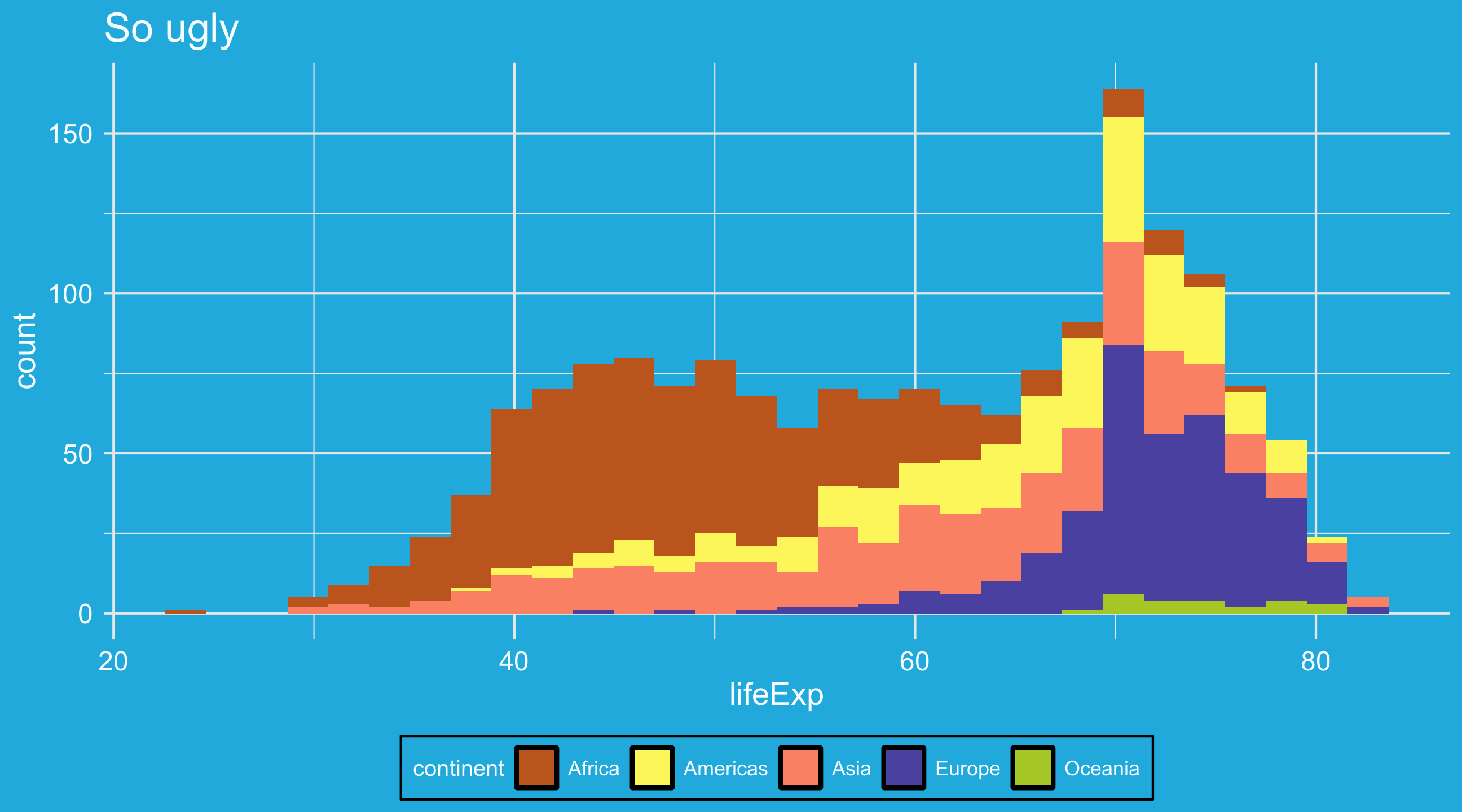
theme_spongeBob() from tvthemes package, many more online

Review

  • Scatterplots?

    geom_point(): two continuous variables (x and y)

  • Time series?

    geom_line(): one time/date variable (x) + one continuous variable (y)

  • Histograms?

    geom_histogram(): one continuous variable (x)

  • Barplots?

    geom_col(): one categorical variable (x) + one continuous variable (y, already summarized)

  • Boxplots?

    geom_boxplot(): one continuous variable (y), often split by one categorical variable (x)

What is data-wrangling?

…the process of transforming and mapping data from one “raw” data form into another format with the intent of making it more appropriate and valuable for a variety of downstream purposes such as analytics… Data analysts typically spend the majority of their time in the process of data wrangling compared to the actual analysis of the data. – Wikipedia

Most of your time working with data will be spent wrangling it into a usable form for analysis

Pipes: connecting data to functions

directors_profit = movies |> 
  # only look at horror movies
  filter(genre1 == "Horror" | genre2 == "Horror" | genre3 == "Horror") |> 
  # calculate profit
  mutate(profit = gross - budget)


You’ve seen these before…

What are pipes?

  • Pipes link data to functions

  • They look like this %>%, or |>

  • Definitely use keyboard shortcuts

    • OSX: Cmd + Shift + M
    • Windows: Ctrl + Shift + M

Why pipes?

With pipes: 😍

penguins %>% 
  filter(species == "Adelie") %>% 
  mutate(body_mass_kg = body_mass_g / 1000) %>% 
  select(body_mass_kg)

Without pipes: 🤢

select(mutate(filter(penguins, species == "Adelie"), body_mass_kg = body_mass_g / 1000), body_mass_kg)


Both produce the same output, but pipes make code more legible

Making sense of pipes: “and then…”

directors_profit = movies %>% 
  # only look at horror movies
  filter(genre1 == "Horror" | genre2 == "Horror" | genre3 == "Horror") %>% 
  # calculate profit
  mutate(profit = gross - budget)


You can read the pipe as if it said “and then”…

  1. Take the data object movies, AND THEN

  2. filter so genre1, genre2, or genre3 equal HORROR, AND THEN

  3. mutate so that…

Subsetting data and logical operators

Our first wrangling function: filter()

filter() subsets data objects based on rules

baby_subset <- babynames %>%
  filter(name == "Angel")

Subset babynames to only babies named Angel

Why filter?

Why filter?

Lots of real-world applications: finding flights, addresses, IDs, etc.

Sometimes we want to focus on a specific subset of data: the South, Latin America, etc.

Useful to deal with common problems: outliers, missing data, strange responses

Using filter()

To use filter(), we need to tell R which observations we want to include (or exclude) using rules


gap_africa = gapminder |> 
  filter(region == "Africa")

Rule: return all observations from gapminder where the region variable is equal to “Africa”

Making the rules: logical operators

  • Rules filter data based on whether variables meet certain criteria

  • Rules rely on logical operators:

    • Equal to, not equal to, less than, more than, included in, etc.

    • Observations that meet the rule are returned; those that are not are dropped
The logical operators

Operator meaning
== equal to
!= not equal to
> greater than
< less than
>= greater than or equal to
<= less than or equal to
& AND (both conditions true)
| OR (either condition is true)
%in% IN (in the set of)

Using filter()

Say we have some data on 🍎

name color pounds sweet
Fuji red 2 TRUE
Gala green 4 TRUE
Macintosh green 8 FALSE
Granny Smith red 3 FALSE

Apples

apples
# A tibble: 4 × 4
  name         color pounds sweet
  <chr>        <chr>  <dbl> <lgl>
1 Fuji         red        2 TRUE 
2 Gala         green      4 TRUE 
3 Macintosh    green      8 FALSE
4 Granny Smith red        3 FALSE

Note

The output reports how many rows and columns our dataset has (4 rows x 4 columns)

Green apples

apples |> 
  filter(color == "green")
# A tibble: 2 × 4
  name      color pounds sweet
  <chr>     <chr>  <dbl> <lgl>
1 Gala      green      4 TRUE 
2 Macintosh green      8 FALSE

Notice words are in quotations!

Notice that the number of rows has decreased: 2 x 4

Green and unsweet apples

apples |> 
  filter(color == "green") |> 
  filter(sweet == FALSE)
# A tibble: 1 × 4
  name      color pounds sweet
  <chr>     <chr>  <dbl> <lgl>
1 Macintosh green      8 FALSE

Notice TRUE/FALSE are all-caps!

Apples that aren’t green

apples |> 
  filter(color != "green")
# A tibble: 2 × 4
  name         color pounds sweet
  <chr>        <chr>  <dbl> <lgl>
1 Fuji         red        2 TRUE 
2 Granny Smith red        3 FALSE

The ! symbol negates: not equal to

At least 4 pounds but less than 6

apples |> 
  filter(pounds >= 4, pounds < 6)
# A tibble: 1 × 4
  name  color pounds sweet
  <chr> <chr>  <dbl> <lgl>
1 Gala  green      4 TRUE 

Notice: at least implies greater than or equal to

I could also split this up over multiple filter calls

apples |> 
  filter(pounds >= 4) |> 
  filter(pounds < 6)
# A tibble: 1 × 4
  name  color pounds sweet
  <chr> <chr>  <dbl> <lgl>
1 Gala  green      4 TRUE 

Combinations: The OR (|) operator

“Observations where either this is true OR that is true”

Apples that are red OR green

apples |> 
  filter(color == "red" | color == "green")
# A tibble: 4 × 4
  name         color pounds sweet
  <chr>        <chr>  <dbl> <lgl>
1 Fuji         red        2 TRUE 
2 Gala         green      4 TRUE 
3 Macintosh    green      8 FALSE
4 Granny Smith red        3 FALSE

Note

The | should be above your Return/Enter key

Combinations: the AND operator (&)

The & operator can be used to combine rules

Returns observations where both rules are true

“Apples that are red AND sweet or green AND sour”:

apples |> 
  filter(color == "red" & sweet == TRUE | color == "green" & sweet == FALSE)

%in%

The %in% operator is super powerful

It returns observations that belong to a set

Say I wanted to look at just South American countries, normally:

gapminder |> 
  filter(country == "Argentina" | country == "Brazil" | country == "Chile")

Brutally repetitive

%in%

Make a list of countries and return observations that match any of them

keep = c("Argentina", "Brazil", "Chile")

gapminder |> filter(country %in% keep)

Note

To make a “list” of items (a vector), use c()

👑 World leaders Example 👑

library(juanr)

?leader

leader |> 
  filter(country == "VNM" & yr_office <= 1 & age == 11)
# A tibble: 1 × 16
  country gwcode leader    gender  year yr_office   age edu   mil_service combat
  <chr>    <dbl> <chr>     <chr>  <dbl>     <dbl> <dbl> <fct>       <dbl>  <dbl>
1 VNM        815 Thanh Th… M       1889         1    11 Seco…           0      0
# ℹ 6 more variables: rebel <dbl>, yrs_exp <dbl>, phys_health <dbl>,
#   mental_health <dbl>, will_force <dbl>, will_force_sd <dbl>

👑 Cars Practice 👑

Open an r script, open the code book to find the variable names, and filter to find the car model.

Next Using the mtcars dataset, identify:

  1. A manual car, with 6 cylinders and the miles per gallon is less than 20.

Note

?mtcars to see the codebook.

👑 Cars Practice Answer 👑

              mpg cyl disp  hp drat   wt qsec vs am gear carb
Ferrari Dino 19.7   6  145 175 3.62 2.77 15.5  0  1    5    6