Data wrangling II
POL51
University of California, Davis
October 21, 2026
Plan for today
Objects
mutate()
summarize()
Homework and midterm questions
Objects
Objects and Pipes
Step 1-2: the data, the pipe, the wrangling functions
Reminder on Objects
In programming, objects can be used to store all sorts of stuff for later use
data, functions, values
We create objects using = or <-
Naming objects
There are only two hard things in Computer Science: cache invalidation and naming things. – Phil Karlton
Recommend: keep it short, easy to type, informative, and use _ to separate words
Making new variables with mutate()
mutate() adds new variables to data
Using mutate
# A tibble: 100 × 4
   state      city       population murder_total
   <chr>      <chr>           <dbl>        <dbl>
 1 Alabama    Mobile         248431        50.0
 2 Alaska     Anchorage      296188        27.0
 3 Arizona    Chandler       249355         5.01
 4 Arizona    Gilbert        242090         5.01
 5 Arizona    Glendale       249273        12.0
 6 Arizona    Mesa           492268        23.0
 7 Arizona    Phoenix       1608139       154.
 8 Arizona    Scottsdale     251840         5.01
 9 Arizona    Tucson         532323        46.0
10 California Anaheim        353400        10.0
# ℹ 90 more rows
Using mutate
# A tibble: 100 × 4
   state      city       population murder_total
   <chr>      <chr>           <dbl>        <dbl>
 1 Alabama    Mobile         248431        50.0
 2 Alaska     Anchorage      296188        27.0
 3 Arizona    Chandler       249355         5.01
 4 Arizona    Gilbert        242090         5.01
 5 Arizona    Glendale       249273        12.0
 6 Arizona    Mesa           492268        23.0
 7 Arizona    Phoenix       1608139       154.
 8 Arizona    Scottsdale     251840         5.01
 9 Arizona    Tucson         532323        46.0
10 California Anaheim        353400        10.0
# ℹ 90 more rows
Using mutate
# A tibble: 100 × 5
   state      city       population murder_total murder_capita
   <chr>      <chr>           <dbl>        <dbl>         <dbl>
 1 Alabama    Mobile         248431        50.0      0.000201
 2 Alaska     Anchorage      296188        27.0      0.0000912
 3 Arizona    Chandler       249355         5.01     0.0000201
 4 Arizona    Gilbert        242090         5.01     0.0000207
 5 Arizona    Glendale       249273        12.0      0.0000481
 6 Arizona    Mesa           492268        23.0      0.0000467
 7 Arizona    Phoenix       1608139       154.       0.0000955
 8 Arizona    Scottsdale     251840         5.01     0.0000199
 9 Arizona    Tucson         532323        46.0      0.0000864
10 California Anaheim        353400        10.0      0.0000283
# ℹ 90 more rows
Notice that I named a new variable, murder_capita
Using mutate
murder_set |>
  mutate(murder_capita = murder_total / population,
         murder_rate = murder_capita * 100000)
# A tibble: 100 × 6
state city population murder_total murder_capita murder_rate
<chr> <chr> <dbl> <dbl> <dbl> <dbl>
1 Alabama Mobile 248431 50.0 0.000201 20.1
2 Alaska Anchorage 296188 27.0 0.0000912 9.12
3 Arizona Chandler 249355 5.01 0.0000201 2.01
4 Arizona Gilbert 242090 5.01 0.0000207 2.07
5 Arizona Glendale 249273 12.0 0.0000481 4.81
6 Arizona Mesa 492268 23.0 0.0000467 4.67
7 Arizona Phoenix 1608139 154. 0.0000955 9.55
8 Arizona Scottsdale 251840 5.01 0.0000199 1.99
9 Arizona Tucson 532323 46.0 0.0000864 8.64
10 California Anaheim 353400 10.0 0.0000283 2.83
# ℹ 90 more rowsNotice the new columns
Forgetting to store
If you don’t store your changes, they will melt away, like tears in the rain
# A tibble: 100 × 4
state city population murder_total
<chr> <chr> <dbl> <dbl>
1 Alabama Mobile 248431 50.0
2 Alaska Anchorage 296188 27.0
3 Arizona Chandler 249355 5.01
4 Arizona Gilbert 242090 5.01
5 Arizona Glendale 249273 12.0
6 Arizona Mesa 492268 23.0
7 Arizona Phoenix 1608139 154.
8 Arizona Scottsdale 251840 5.01
9 Arizona Tucson 532323 46.0
10 California Anaheim 353400 10.0
# ℹ 90 more rowsNew object, or overwite the old one?
You can make a new object:
Or overwrite the old one
In general, overwriting when you are adding stuff to your data (mutate) is fine
# A tibble: 100 × 6
   state      city       population murder_total murder_capita murder_rate
   <chr>      <chr>           <dbl>        <dbl>         <dbl>       <dbl>
 1 Alabama    Mobile         248431        50.0      0.000201        20.1
 2 Alaska     Anchorage      296188        27.0      0.0000912        9.12
 3 Arizona    Chandler       249355         5.01     0.0000201        2.01
 4 Arizona    Gilbert        242090         5.01     0.0000207        2.07
 5 Arizona    Glendale       249273        12.0      0.0000481        4.81
 6 Arizona    Mesa           492268        23.0      0.0000467        4.67
 7 Arizona    Phoenix       1608139       154.       0.0000955        9.55
 8 Arizona    Scottsdale     251840         5.01     0.0000199        1.99
 9 Arizona    Tucson         532323        46.0      0.0000864        8.64
10 California Anaheim        353400        10.0      0.0000283        2.83
# ℹ 90 more rowsNew object, or overwite the old one?
Overwriting when you are removing information from the data can be bad
For example, when we filter()
# A tibble: 624 × 6
   country continent  year lifeExp      pop gdpPercap
   <fct>   <fct>     <int>   <dbl>    <int>     <dbl>
 1 Algeria Africa     1952    43.1  9279525     2449.
 2 Algeria Africa     1957    45.7 10270856     3014.
 3 Algeria Africa     1962    48.3 11000948     2551.
 4 Algeria Africa     1967    51.4 12760499     3247.
 5 Algeria Africa     1972    54.5 14760787     4183.
 6 Algeria Africa     1977    58.0 17152804     4910.
 7 Algeria Africa     1982    61.4 20033753     5745.
 8 Algeria Africa     1987    65.8 23254956     5681.
 9 Algeria Africa     1992    67.7 26298373     5023.
10 Algeria Africa     1997    69.2 29072015     4797.
# ℹ 614 more rows
This is bad, since we lose the original gapminder data
Creating categories
Creating categories with case_when()
Sometimes we want to create categorical variables (tall, short, poor, rich, Republican-leaning, Democrat-leaning, etc.)
We can use case_when(), which goes within mutate()
Like filter(), case_when() also relies on logical operators
Who won the county?
| name | state | per_gop_2020 | per_dem_2020 |
|---|---|---|---|
| Tipton County | TN | 0.73 | 0.25 |
| New Haven County | CT | 0.41 | 0.58 |
| Pawnee County | NE | 0.75 | 0.23 |
| Franklin County | AR | 0.80 | 0.18 |
| Dickinson County | MI | 0.66 | 0.33 |
| Freeborn County | MN | 0.57 | 0.41 |
| Hardin County | OH | 0.75 | 0.23 |
| Tuscola County | MI | 0.69 | 0.30 |
| Los Alamos County | NM | 0.35 | 0.61 |
| San Francisco County | CA | 0.13 | 0.85 |
Who won the county?
The general formula: case_when(CONDITION ~ LABEL)
# A tibble: 3,152 × 4
   name            state per_gop_2020 per_dem_2020
   <chr>           <chr>        <dbl>        <dbl>
 1 Autauga County  AL           0.714       0.270
 2 Baldwin County  AL           0.762       0.224
 3 Barbour County  AL           0.535       0.458
 4 Bibb County     AL           0.784       0.207
 5 Blount County   AL           0.896       0.0957
 6 Bullock County  AL           0.248       0.747
 7 Butler County   AL           0.575       0.418
 8 Calhoun County  AL           0.688       0.298
 9 Chambers County AL           0.573       0.416
10 Cherokee County AL           0.860       0.132
# ℹ 3,142 more rows
Who won the county?
The general formula: case_when(CONDITION ~ LABEL)
# A tibble: 3,152 × 5
   name            state per_gop_2020 per_dem_2020 who_won
   <chr>           <chr>        <dbl>        <dbl> <chr>
 1 Autauga County  AL           0.714       0.270  Republicans
 2 Baldwin County  AL           0.762       0.224  Republicans
 3 Barbour County  AL           0.535       0.458  Republicans
 4 Bibb County     AL           0.784       0.207  Republicans
 5 Blount County   AL           0.896       0.0957 Republicans
 6 Bullock County  AL           0.248       0.747  <NA>
 7 Butler County   AL           0.575       0.418  Republicans
 8 Calhoun County  AL           0.688       0.298  Republicans
 9 Chambers County AL           0.573       0.416  Republicans
10 Cherokee County AL           0.860       0.132  Republicans
# ℹ 3,142 more rows
Note
Remember when we mutate() we have to name the new variable
Who won the county?
The general formula: case_when(CONDITION ~ LABEL)
small_elections |>
  mutate(who_won = case_when(per_gop_2020 > per_dem_2020 ~ "Republicans",
                             per_dem_2020 > per_gop_2020 ~ "Democrats"))
# A tibble: 3,152 × 5
name state per_gop_2020 per_dem_2020 who_won
<chr> <chr> <dbl> <dbl> <chr>
1 Autauga County AL 0.714 0.270 Republicans
2 Baldwin County AL 0.762 0.224 Republicans
3 Barbour County AL 0.535 0.458 Republicans
4 Bibb County AL 0.784 0.207 Republicans
5 Blount County AL 0.896 0.0957 Republicans
6 Bullock County AL 0.248 0.747 Democrats
7 Butler County AL 0.575 0.418 Republicans
8 Calhoun County AL 0.688 0.298 Republicans
9 Chambers County AL 0.573 0.416 Republicans
10 Cherokee County AL 0.860 0.132 Republicans
# ℹ 3,142 more rowsSummarizing data in R
Summary statistics with summarize()
We can use summarize() to calculate things like the mean, median, etc.

Summarizing condenses data into statistics
Using summarize()
Say I want to know the average life expectancy in the world in 2007:
# A tibble: 52 × 6
   country                  continent  year lifeExp      pop gdpPercap
   <fct>                    <fct>     <int>   <dbl>    <int>     <dbl>
 1 Algeria                  Africa     2007    72.3 33333216     6223.
 2 Angola                   Africa     2007    42.7 12420476     4797.
 3 Benin                    Africa     2007    56.7  8078314     1441.
 4 Botswana                 Africa     2007    50.7  1639131    12570.
 5 Burkina Faso             Africa     2007    52.3 14326203     1217.
 6 Burundi                  Africa     2007    49.6  8390505      430.
 7 Cameroon                 Africa     2007    50.4 17696293     2042.
 8 Central African Republic Africa     2007    44.7  4369038      706.
 9 Chad                     Africa     2007    50.7 10238807     1704.
10 Comoros                  Africa     2007    65.2   710960      986.
# ℹ 42 more rows
Using summarize()
Using summarize()
# A tibble: 1 × 1
  avg_life
     <dbl>
1     54.8
Notice how the data has been summarized: only one row
Notice that I’ve named the summary statistic avg_life
Using summarize()
What if I also wanted to know the median life expectancy?
Using summarize()
What if I also wanted to know the min and max life expectancy?
Using summarize()
What if I also wanted to know the standard deviation of life expectancy?
Using summarize()
summarize() is like mutate() in that you are creating new variables
So note that you have to name the new variables!
We can use summary functions in filter
which country had the lowest life expectancy in 2007?
We can use summary functions in filter
which countries had above average GPD but below average health?
# A tibble: 6 × 6
  country           continent  year lifeExp      pop gdpPercap
  <fct>             <fct>     <int>   <dbl>    <int>     <dbl>
1 Angola            Africa     2007    42.7 12420476     4797.
2 Botswana          Africa     2007    50.7  1639131    12570.
3 Equatorial Guinea Africa     2007    51.6   551201    12154.
4 Namibia           Africa     2007    52.9  2055080     4811.
5 South Africa      Africa     2007    49.3 43997828     9270.
6 Swaziland         Africa     2007    39.6  1133066     4513.
Woe unto us: missing data
In life, sometimes data is missing
respondent doesn’t answer a question, no one knows Afghanistan’s GDP in 1943, etc.
R represents missing data as NA
| name | type1 | type2 | height_m | weight_kg |
|---|---|---|---|---|
| Muk | poison | poison | NA | NA |
| Lycanroc | rock | NA | NA | NA |
| Hoopa | psychic | ghost | NA | NA |
| Golem | rock | ground | NA | NA |
| Graveler | rock | ground | NA | NA |
| Meowth | normal | dark | NA | NA |
Summarizing with missing data
If you try to summarize data that has missing values, R will return NA:
Note
Any math operation with NA will return NA (.e.g, 3 + NA = NA)
What to do?
There are whole classes on what to do with missing data (impute, simulate, model, etc.)
In this class we will tell R to ignore missing observations
Remember…
If you’re trying to calculate a summary statistic and keep getting NA…
99.99999% of the time you need to add na.rm = TRUE to your function!
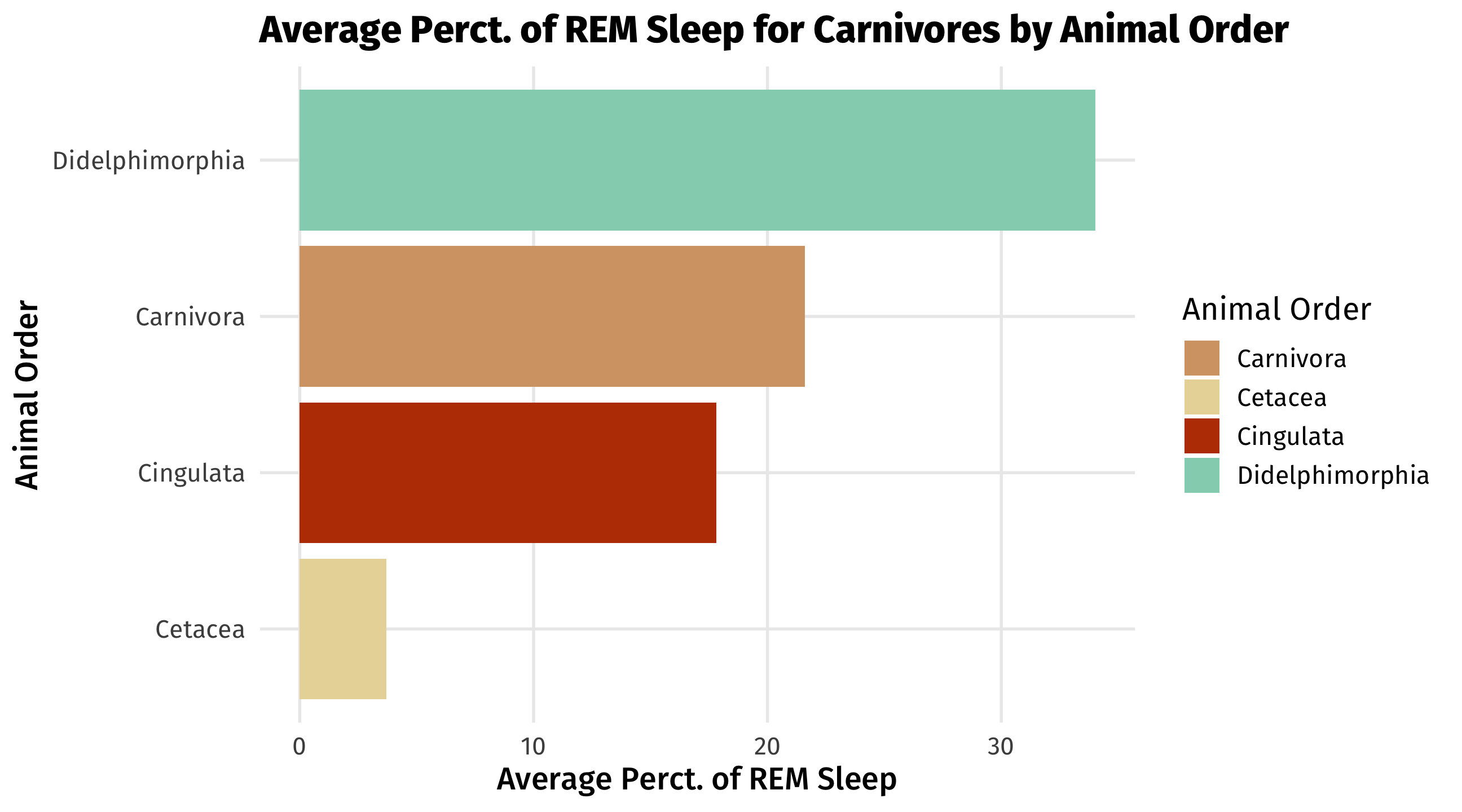
🚨 Your turn: 🦁 Animals 🦁 🚨
Using the msleep dataset in tidyverse:
Subset the data to
carnianimals (column name isvore) only, make a new variable for the difference in thesleep_totalandsleep_remas a percent calledrem_perc.What is the the average percent of
rem_sleepgrouped by theorder.Using a bar plot, plot the different percentages of rem sleep by order.
Tip
Remember to attach your libraries using
library()To group by a variable(s) use the function
group_by()data |>group_by(variable_name) |>mutate() or summarize()
🚨 🦁 Animals Answer 🦁 🚨
library(tidyverse)

dat <- msleep |>
  filter(vore == "carni") |>
  mutate(
    rem_perc = sleep_rem/sleep_total * 100
  )

dat_2 <- dat |>
  group_by(order) |>
  summarize(mean = mean(rem_perc, na.rm = TRUE)
  )

ggplot(dat_2, aes(y = order, x = mean)) +
  geom_col(fill = "skyblue") +
  labs(title = "Average Perct. of REM Sleep for Carnivores by Animal Order",
       x = "Average Perct. of REM Sleep",
       y = "Animal Order")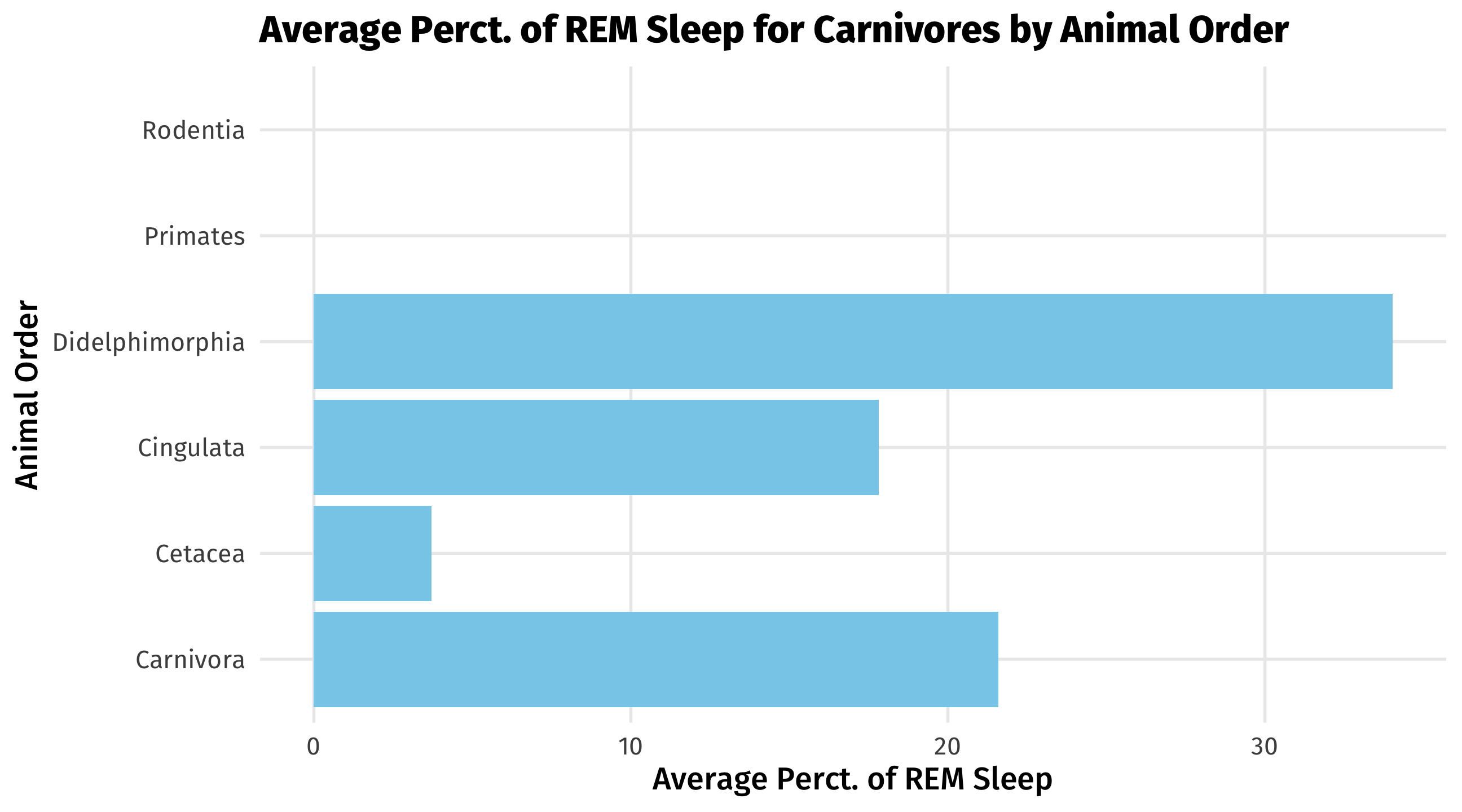
🚨 🦁 Animals Adv. Answer 🦁 🚨
library(tidyverse)

dat <- msleep |>
  filter(vore == "carni") |>
  mutate(
    rem_perc = sleep_rem/sleep_total * 100
  ) |>
  group_by(order) |>
  summarize(mean = mean(rem_perc, na.rm = TRUE)
  ) |>
  filter(!is.na(mean))

savannah_apex <- c("#D4A373", "#E9D8A6", "#BB3E03", "#94D2BD", "#0A9396")

ggplot(dat, aes(x = mean, y = reorder(order, mean), fill=order)) +
  geom_col() +
  scale_fill_manual(values = savannah_apex,
                    name = "Animal Order") +
  labs(title = "Average Perct. of REM Sleep for Carnivores by Animal Order",
       x = "Average Perct. of REM Sleep",
       y = "Animal Order")